
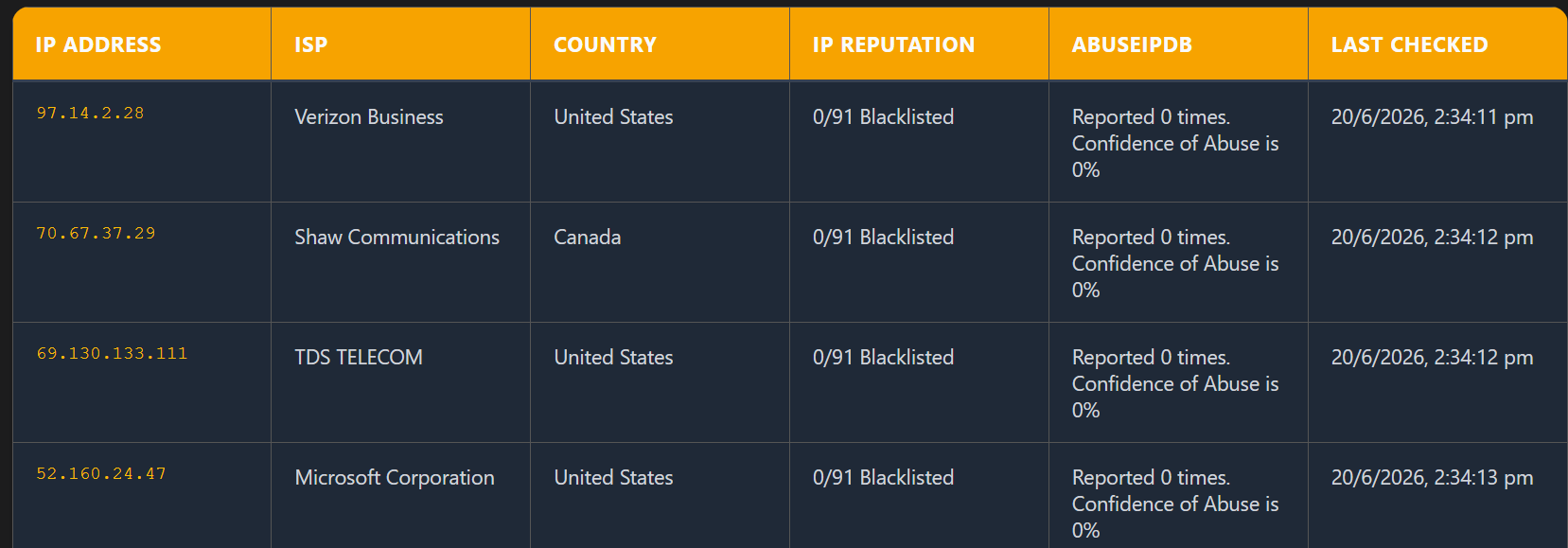
An IP reputation result is a signal to investigate, not a verdict. To give users another source of context, BulkIPLab can request an IP report from AbuseIPDB alongside its existing VirusTotal lookup. This article describes the request flow in the app, the fields it displays, and the reasons an analyst should avoid treating a score as proof of malicious activity.
Request flow: browser to provider
The browser does not call AbuseIPDB directly. When the user enables the AbuseIPDB option, the frontend sends the IP list and provider selections to BulkIPLab’s own /api/ip_lookup endpoint. The server reads the AbuseIPDB credential from its environment and makes the provider request. Keeping the credential on the server avoids embedding it in browser code or exposing it in a request made by the client.
A simplified request body looks like this:
{
  "ips": ["198.51.100.25"],
  "includeVirusTotal": false,
  "includeAbuseIPDB": true
}
The address above is reserved for documentation examples; it is not a real reputation result. The endpoint validates that the IP list is non-empty, that the provider options are booleans, and that at least one provider is selected. The app can therefore request AbuseIPDB without also requesting VirusTotal.
What the server asks AbuseIPDB for
For each requested address, the backend calls AbuseIPDB’s Check endpoint with a 90-day report window. It reads the returned report count, confidence score, and ISP when those fields are available, then includes them in BulkIPLab’s response. The summary shown in the results table is built from the count and score; the individual values are also retained as separate response fields for the app.
The relevant request is equivalent to:
GET https://api.abuseipdb.com/api/v2/check
    ?ipAddress=<URL-encoded-IP>
    &maxAgeInDays=90

Headers:
  Key: <server-side API key>
  Accept: application/json
The IP address is URL-encoded before it is added to the query string. The backend accepts either ABUSEIPDB_API_KEY or a comma- or newline-separated ABUSEIPDB_API_KEYS value. Never put either variable in frontend code, a public repository, or a client-side environment variable that gets bundled into the site.
Configure the credential on the server
In a Vercel deployment, add the credential in the project’s environment variables using one of the supported names above. Apply it to the environments where you intend to enable the integration, then redeploy so the serverless function receives the updated value. For local development, provide the variable through a local environment file that is excluded from version control. Use the provider’s account dashboard to create and manage the key.
Interpret the report count and score carefully
A report count indicates how many reports AbuseIPDB associates with the address; a confidence score is the provider’s estimate based on its reporting data. Neither is a direct measurement of what the address is doing in your network right now. The 90-day query window is also relevant: this integration asks for a recent reporting period, not a complete history of the address.
IP addresses can be reassigned, shared by many users, or used by hosting, VPN, and proxy services. Reports may be old, incomplete, or describe activity that does not match the traffic you observed. A low score does not prove an address is safe, and a high score alone is not enough to justify blocking it. Compare the result with timestamps, connection direction, ports, internal asset context, and other independent evidence before taking action.
How to use the result in a triage workflow
- Record where and when the IP appeared, including the affected system, destination or source role, and relevant protocol or port.
- Enable AbuseIPDB in the IP lookup options and compare its report summary with the other requested provider results.
- Check whether the observed activity fits the reported context. Treat shared infrastructure and recently reassigned addresses with extra care.
- Confirm a suspected threat using additional telemetry or investigation before blocking an address or escalating an incident.
- Record the sources consulted and the evidence behind the final decision so another analyst can review it.
Failure cases and what to check
- No credential configured: confirm the deployment environment has
ABUSEIPDB_API_KEYorABUSEIPDB_API_KEYSset, then redeploy. - Unauthorized or rate-limited response: verify the key and account access. The current endpoint can try another configured key for authorization or rate-limit responses; adding keys does not remove provider quotas.
- No report summary: the provider response may not include the expected fields. Do not interpret missing data as a clean result.
- Provider request failure: check the function logs and provider status. A lookup failure means the reputation result is unavailable, not that the IP is benign.
What this integration does—and does not do
The integration adds an optional AbuseIPDB lookup to the existing bulk IP workflow and displays its summary with the other results. It does not perform a network scan, establish attribution, verify an incident, or replace an analyst’s review. Its value is as one additional source that can help prioritize investigation when interpreted alongside relevant local evidence.
References
Provider response fields and rate limits can change. Consult the current AbuseIPDB documentation and your account’s plan details when implementing or troubleshooting an integration.